1)数据备份:guduo.net、MT、MySQL 一个不少
2)程序临时备份:cgi-bin/mt mt-static
3)移动相关目录升级
4)设置style
5)修改style的css --
$ cp .../mt-static_back/support/themes/minimalist-green/minimalist-green.css ./
1)数据备份:guduo.net、MT、MySQL 一个不少
2)程序临时备份:cgi-bin/mt mt-static
3)移动相关目录升级
4)设置style
5)修改style的css --
$ cp .../mt-static_back/support/themes/minimalist-green/minimalist-green.css ./
自从半年前被河蟹以后,无论是web访问还是ssh上guduo.net都变的异常困难。
曾经想过一些办法,www访问还是很好的解决了的,找几个可用的代理即可。但想要ssh上来还是折腾了一些时间。
最初是想直接使用fg的代理模式上来,不过后来试了好像行不通,另外也不是很稳定,后来就没有继续尝试。
之前无聊折腾了一个free shell ,上来升级了一把MT,后来也没怎么继续玩它了。
今天晚上带闺女,5点多就睡不着了,起来看看俺的网站,顺便也使用一下俺之前的free shell,
没想到今天大有收获:
1)silenceisdefeat.org是支持 ssh tunnel的,更令我高兴的是,还提供了另外的端口来访问,
ssh.silenceisdefeat.org fw.silenceisdefeat.org都可以使用443 80来访问的,真是太爽了。
当然,支持ssh的free shell也很爽,这样就可以实战一把putty来直接ssh到guduo.net了。
2)上面silenceisdefeat.org提供了3个域名,分别有三个IP,我都直接ssh上去之后发现其实都是登陆到了silenceisdefeat.org,这个地方怎么实现的还想更深入的了解看看:
lo0: flags=8049<UP,LOOPBACK,RUNNING,MULTICAST> mtu 33224
groups: lo
inet 127.0.0.1 netmask 0xff000000
inet6 ::1 prefixlen 128
inet6 fe80::1%lo0 prefixlen 64 scopeid 0x5
em0: flags=8843<UP,BROADCAST,RUNNING,SIMPLEX,MULTICAST> mtu 1500
lladdr 00:30:48:54:39:ab
groups: egress
media: Ethernet 10baseT full-duplex
status: active
inet 66.111.62.170 netmask 0xffffff00 broadcast 66.111.62.255
inet6 fe80::230:48ff:fe54:39ab%em0 prefixlen 64 scopeid 0x1
pflog0: flags=141<UP,RUNNING,PROMISC> mtu 33224
pfsync0: flags=0<> mtu 1460
groups: carp
enc0: flags=0<> mtu 1536
好奇的跑到guduo.net上也ifconfig了一把:
$ ifconfig | grep "inet addr"
inet addr:74.220.199.22 Bcast:74.220.199.255 Mask:255.255.255.0
inet addr:74.220.199.100 Bcast:74.220.199.255 Mask:255.255.255.0
inet addr:74.220.199.123 Bcast:74.220.199.255 Mask:255.255.255.0
inet addr:74.220.199.130 Bcast:74.220.199.255 Mask:255.255.255.0
inet addr:74.220.199.133 Bcast:74.220.199.255 Mask:255.255.255.0
inet addr:74.220.199.185 Bcast:74.220.199.255 Mask:255.255.255.0
inet addr:74.220.199.190 Bcast:74.220.199.255 Mask:255.255.255.0
inet addr:74.220.199.200 Bcast:74.220.199.255 Mask:255.255.255.0
inet addr:74.220.199.209 Bcast:74.220.199.255 Mask:255.255.255.0
inet addr:74.220.199.231 Bcast:74.220.199.255 Mask:255.255.255.0
inet addr:74.220.199.240 Bcast:74.220.199.255 Mask:255.255.255.0
inet addr:74.220.199.249 Bcast:74.220.199.255 Mask:255.255.255.0
inet addr:74.220.199.55 Bcast:74.220.199.255 Mask:255.255.255.0
inet addr:74.220.199.56 Bcast:74.220.199.255 Mask:255.255.255.0
inet addr:74.220.199.57 Bcast:74.220.199.255 Mask:255.255.255.0
inet addr:74.220.199.73 Bcast:74.220.199.255 Mask:255.255.255.0
inet addr:74.220.199.75 Bcast:74.220.199.255 Mask:255.255.255.0
inet addr:74.220.199.76 Bcast:74.220.199.255 Mask:255.255.255.0
inet addr:74.220.199.79 Bcast:74.220.199.255 Mask:255.255.255.0
inet addr:74.220.199.81 Bcast:74.220.199.255 Mask:255.255.255.0
inet addr:74.220.199.84 Bcast:74.220.199.255 Mask:255.255.255.0
inet addr:74.220.199.99 Bcast:74.220.199.255 Mask:255.255.255.0
inet addr:74.220.199.74 Bcast:74.220.199.255 Mask:255.255.255.0
inet addr:74.220.199.246 Bcast:74.220.199.255 Mask:255.255.255.0
inet addr:74.220.199.107 Bcast:74.220.199.255 Mask:255.255.255.0
inet addr:74.220.199.215 Bcast:74.220.199.255 Mask:255.255.255.0
inet addr:74.220.199.180 Bcast:74.220.199.255 Mask:255.255.255.0
2008.12.14发现新增的:
inet addr:74.220.199.87 Bcast:74.220.199.255 Mask:255.255.255.0
inet addr:74.220.199.113 Bcast:74.220.199.255 Mask:255.255.255.0
发现这个机器的IP真不少啊~~去掉第一个,发现其它的基本都可以ping通,再试试ssh,
竟然上来了!确认没有通过ssh tunnel上来的之后真是高兴了一把,这样以后就可以很方便的直接上来拉,而且用我的fastdomain帐号来做ssh tunnel,速度更是比free shell快了不知道多少倍!俺这台主机上的用户很少,另外由于被河蟹,机器负载很轻啊。
不过不爽的是fastdomain不提供其它端口的ssh访问,而在公司22端口是被封了的 -- BT,开放了23端口,22端口竟然封禁!
高兴之余跑去找了一下fastdomain的客服,竟然要我购买独立IP,30$一年呢,也太贵了啊,玩不起。
反正俺的blog是自娱自乐,先暂且就这么玩着,只要自己能很方便的ssh上来,也可以很方便的ssh proxy访问就很高兴了!

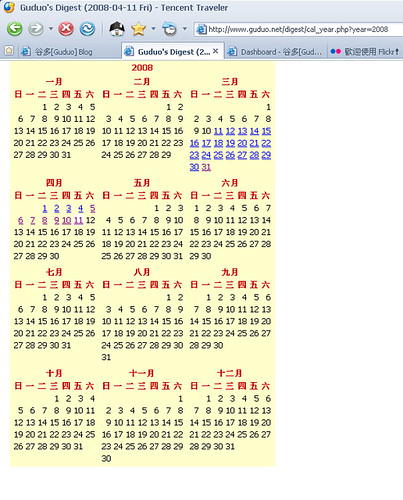
可以参考下面的文档:
http://www.movabletype.org/documentation/administrator/publishing/archive-mapping.html
http://www.movabletype.org/documentation/appendices/archive-file-path-specifiers.html
%e
A numeric entry ID padded with leading zeroes to six digits. Example: 000040
%e%x
可以指定文件名:
archive/%e%x
%x是文件名后缀
http://www.movabletype.org/documentation/appendices/tags/entryprevious.html
EntryPrevious
Type: block
A container tag that creates a context to the previous entry before the one in context.
Example
<mt:EntryPrevious>
<!-- do something -->
</mt:EntryPrevious>
http://www.movabletype.org/documentation/appendices/tags/entrynext.html
EntryNext
Type: block
A container tag that creates a context to the next entry after the one in context.
Example
<mt:EntryNext>
<!-- do something -->
</mt:EntryNext>
MT增加一个widget LinkList,由于增加一些自己常用的链接的入口;
修改了awstats的配置,打开了一些plugins:
Created by awstats (plugins: hostinfo, qqhostinfo, geoip_city_maxmind, hashfiles, geoip, decodeutfkeys, tooltips)
其中qqhostinfo最为恼火,参考了网上一些资料,因为自己的awstats完全按照
http://wiki.dreamhost.com中的教程进行安装,修改qqwry.pl时指定QQWry.Dat的时候总是有问题,测试了几次才搞定:
awstats/cgi-bin/plugins/
QQWry.Dat
qqwry.pl
qqhostinfo.pm
可以的配置有三种:
my $ipfile="${DIR}/plugins/QQWry.Dat";
#my $ipfile="./plugins/QQWry.Dat";
#my $ipfile="/home/xxxx/awstats/cgi-bin/plugins/QQWry.Dat";
http://mt-hacks.com/20070828-easily-install-template-sets-with-template-installer.html
Installation
Download and extract the zip file, and upload the contents of 'plugins' folder to the 'plugins' directory of your Movable Type installation.
Go to Design > Templates and then choose the "Install Templates" link from the lower right of the page.
Choose a template set from the drop-down box, then click continue.
View the results, then click "return to templates", and you are done.
注意了,这里的文件需要放到cgi-bin目录下面的plugs目录,而不是静态文件的plugins目录。
安装google sitemap:copy到 Template Installer的安装目录的templates_sets目录。
http://mt-hacks.com/20070904-google-sitemap-template-for-mt4.html
swanksalot, the template set (inluding the directory) should be uploaded to:
path/to/mt/plugins/TemplateInstaller/template_sets/
In this case, upload the "google_sitemaps" directory into the above location, then run Template Installer.
Regarding Template Installer rendering your site unusable, that is odd. If you are still having such problems, post full details on the Template Installer entry.
就是静态文件和cgi-bin目录下面的2个plugins目录让我郁闷了一个晚上。。。
唉,有时候真怀疑自己是不是太笨了。
上周找遍MT的js代码,没能搞定用IE访问MT编辑日记时,在WYSIWYG编辑器中输入URL地址自动默认变成可点击链接,但不是默认的target="_blank"。
昨天回家继续看代码加了很多alert调试,仍然没有找到修改的地方。
今天更是从初始化开始看,没找到这个自动变成可点击的link的任何事件触发函数。无奈之下,只好到网上找其他WYSIWYG编辑器看看。
不看不知道,一看吓一跳,原来所有的WYSIWYG编辑器都是这样,可以肯定的是这里的实现逻辑代码已经不是需要手工来写的了。
另外一点也可以确认:在firefox中使用时,是不会默认变成可点击的link的。这么nb的blog程序,肯定应该会想到多浏览器兼容吧?
既然不需要手工写,那是否有其它可以设置的参数来修改呢?找了半天,还是不能找到,但对于所见即所得的html 编辑器倒是有了一份了解。
重点就是属性:document.designMode 了,可以在网上找到很多相关资料。
IE还可以使用 contentEditable 属性来设定。
几个免费的richedit 和相关文档。
http://www.google.com/search?hl=en&newwindow=1&q=JS+WYSIWYG+editor&btnG=Search
http://www.gerd-tentler.de/tools/richedit/
http://nicedit.com/
http://www.blueshoes.org/en/javascript/editor/
http://www.google.com/search?hl=en&q=WYSIWYG+textarea+link+
http://www.dynamicdrive.com/dynamicindex16/openwysiwyg/index.htm
document.designMode
http://operawiki.info/TextAreaEditor
http://www.google.com/search?hl=en&q=document.designMode
http://devedge-temp.mozilla.org/viewsource/2003/midas/01/index_en.html
http://www.devguru.com/features/tutorials/wysiwyg/wysiwyg2.html
http://samples.msdn.microsoft.com/workshop/samples/browser/webediting/onepageeditor.htm
http://msdn2.microsoft.com/en-us/library/aa753622(VS.85).aspx?url=/library/en-us/WCF_con/html/1e8d04dd-b7cf-41e7-8560-54b4381beb0f.asp?frame=true#activating_from_scr_and_html


Recent Comments